What Is JWT?
Token-based authentication, explained simply — with a practical ASP.NET Core example
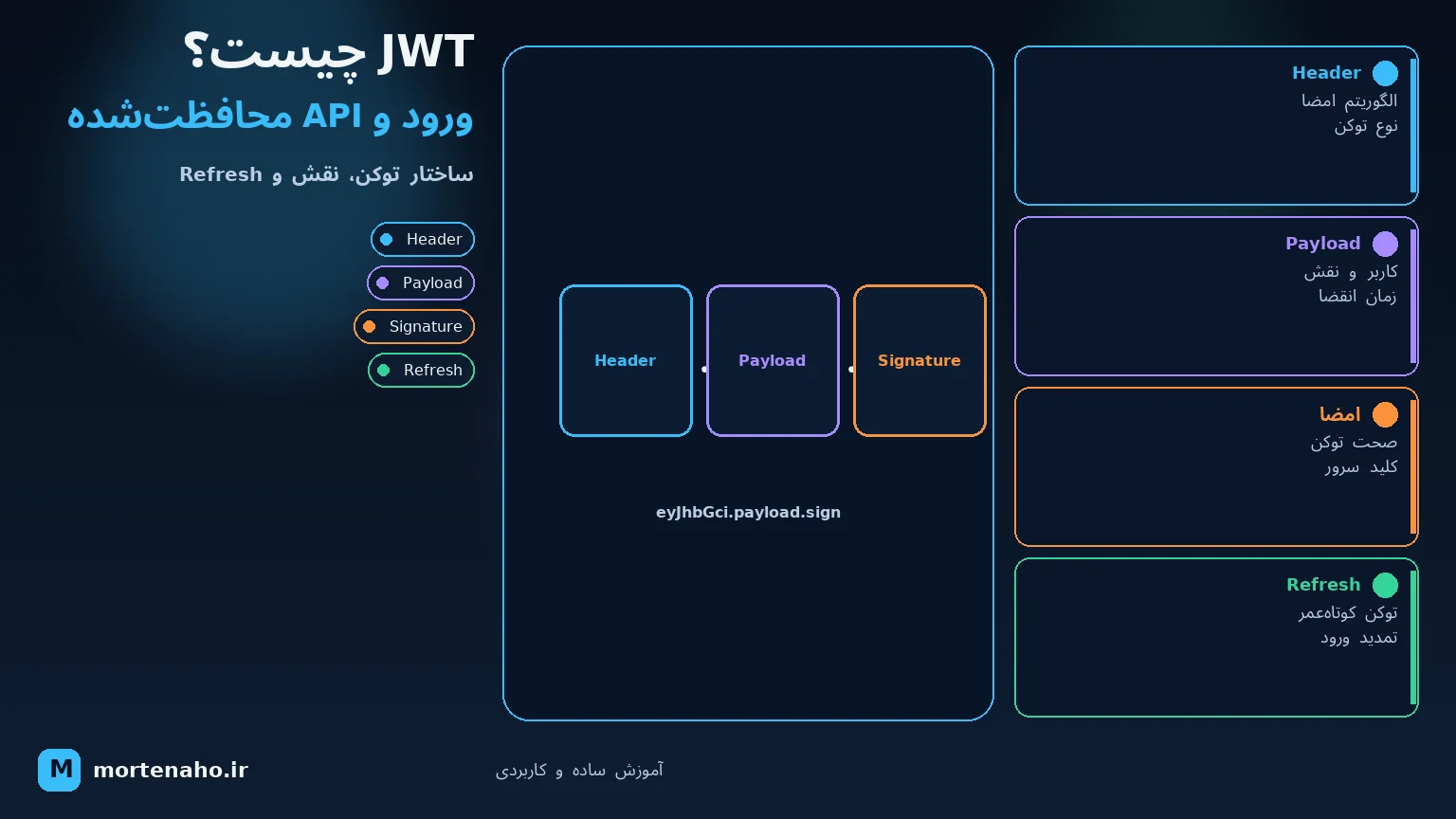
What we'll build
We have a small API. The user signs in with a username and password, the server issues a JWT, and the user uses that token to access protected routes.
The goal isn't to memorize jargon — we want to understand exactly what JWT is, how it works, and where security matters.
1. What is JWT?
JWT stands for JSON Web Token. In simple terms, a JWT is like a digital access card that the server gives the user after a successful login.
Imagine entering a company building. Security checks your identity and gives you a visitor badge. From then on, you don't show your ID every time you enter an authorized room — you show the badge.
In an API, roughly the same thing happens:
- You send username and password once to the login endpoint.
- The server verifies the credentials and creates a JWT.
- In later requests, you send the JWT along with the request.
- The server checks the token's validity and your access level.
2. How does login work?
/login.A protected request header looks like this:
Authorization: Bearer eyJhbGciOiJIUzI1NiIs...
The word Bearer means "whoever holds this token." Anyone with a valid token can use it — like cash. That's why a leaked token is dangerous.
3. What is a JWT made of?
A JWT has three parts separated by dots:
xxxxx.yyyyy.zzzzz
Header.Payload.Signature
Header — technical metadata
Specifies the token type and signing algorithm:
{
  "alg": "HS256",
  "typ": "JWT"
}
Payload — data or claims
Contains the information needed about the user:
{
  "sub": "42",
  "name": "Sara",
  "role": "Admin",
  "exp": 1784491200
}
Each piece of data in the Payload is called a Claim. For example, sub is the user ID, role is the role, and exp is the token expiry time.
Signature — the signature
The server signs the first two parts with a secret key. If someone changes the Payload, the signature no longer matches and the server rejects the token.
4. A practical ASP.NET Core example
Create a Minimal API project and install the JWT authentication package:
dotnet new webapi -n JwtDemo
cd JwtDemo
dotnet add package Microsoft.AspNetCore.Authentication.JwtBearer
Configure the key in appsettings.json
{
  "Jwt": {
    "Key": "A-DEMO-SECRET-KEY-AT-LEAST-32-CHARS!",
    "Issuer": "JwtDemoApi",
    "Audience": "JwtDemoClient"
  }
}Full Program.cs code
using System.IdentityModel.Tokens.Jwt;
using System.Security.Claims;
using System.Text;
using Microsoft.AspNetCore.Authentication.JwtBearer;
using Microsoft.IdentityModel.Tokens;

var builder = WebApplication.CreateBuilder(args);

var jwtKey = builder.Configuration["Jwt:Key"]
    ?? throw new InvalidOperationException("JWT key is missing");
var issuer = builder.Configuration["Jwt:Issuer"];
var audience = builder.Configuration["Jwt:Audience"];

builder.Services
    .AddAuthentication(JwtBearerDefaults.AuthenticationScheme)
    .AddJwtBearer(options =>
    {
        options.TokenValidationParameters = new TokenValidationParameters
        {
            ValidateIssuer = true,
            ValidateAudience = true,
            ValidateLifetime = true,
            ValidateIssuerSigningKey = true,
            ValidIssuer = issuer,
            ValidAudience = audience,
            IssuerSigningKey = new SymmetricSecurityKey(
                Encoding.UTF8.GetBytes(jwtKey)),
            ClockSkew = TimeSpan.Zero
        };
    });

builder.Services.AddAuthorization();

var app = builder.Build();

app.UseHttpsRedirection();
app.UseAuthentication();
app.UseAuthorization();

app.MapPost("/login", (LoginRequest request) =>
{
    // For demo only; in a real project, load the user from the database
    // and verify the hashed password with PasswordHasher.
    if (request.Username != "sara" || request.Password != "123456")
        return Results.Unauthorized();

    var claims = new[]
    {
        new Claim(JwtRegisteredClaimNames.Sub, "42"),
        new Claim(ClaimTypes.Name, "Sara"),
        new Claim(ClaimTypes.Role, "Admin"),
        new Claim(JwtRegisteredClaimNames.Jti, Guid.NewGuid().ToString())
    };

    var key = new SymmetricSecurityKey(Encoding.UTF8.GetBytes(jwtKey));
    var credentials = new SigningCredentials(
        key, SecurityAlgorithms.HmacSha256);

    var token = new JwtSecurityToken(
        issuer: issuer,
        audience: audience,
        claims: claims,
        expires: DateTime.UtcNow.AddMinutes(15),
        signingCredentials: credentials);

    var tokenText = new JwtSecurityTokenHandler().WriteToken(token);
    return Results.Ok(new { accessToken = tokenText });
});

app.MapGet("/profile", (ClaimsPrincipal user) =>
{
    return Results.Ok(new
    {
        Name = user.Identity?.Name,
        Message = "You are signed in."
    });
}).RequireAuthorization();

app.MapGet("/admin", () => "Only an admin can see this message.")
   .RequireAuthorization(policy => policy.RequireRole("Admin"));

app.Run();

record LoginRequest(string Username, string Password);
What does this code do?
AddAuthenticationtells ASP.NET Core that our auth method is Bearer Token.TokenValidationParametersdefines the token validation rules.- The
/loginroute verifies the user and issues a 15-minute token. RequireAuthorizationblocks access without a valid token.- The
/adminroute requires a valid token and theAdminrole.
UseAuthentication and UseAuthorization matters: identity must be established first, then access is checked.
5. Testing the API
Run the application:
dotnet runReplace https://localhost:7001 with the HTTPS URL shown in the terminal. Log in first:
curl -k -X POST https://localhost:7001/login \
  -H "Content-Type: application/json" \
  -d '{"username":"sara","password":"123456"}'
The response includes the token:
{
  "accessToken": "eyJhbGciOiJIUzI1NiIs..."
}
Now put the token value in the next request:
curl -k https://localhost:7001/profile \
  -H "Authorization: Bearer YOUR_TOKEN"
Without the Authorization header you get 401 Unauthorized. If the token is valid but you lack the required role, you typically get 403 Forbidden.
| Code | Plain meaning |
|---|---|
401 | Identity unknown — no token, invalid token, or expired token. |
403 | Identity known, but you don't have enough permission for this action. |
6. Access Token and Refresh Token
Access Tokens should have a short lifetime — say 5 to 15 minutes. But you don't want users to re-enter their password every 15 minutes. That's where a Refresh Token comes in.
- Access Token: short-lived; sent with every API request.
- Refresh Token: longer-lived; used only to obtain a new Access Token.
A Refresh Token is usually a random string, not necessarily a JWT. Store it hashed in the database and support revocation, expiry, and rotation.
7. Important security notes
- Always use HTTPS: without HTTPS, tokens can be stolen in transit.
- Short lifetime: a short-lived Access Token limits damage from a stolen token.
- Strong key: for HS256, use a long random key and keep it out of code and Git.
- Full validation: verify signature, issuer, audience, and expiry.
- Minimal data: put only necessary claims in the token — a JWT is not a database.
- Real passwords: never store passwords in plain text; use ASP.NET Core Identity or
PasswordHasher. - Browser storage: keeping tokens in
localStoragelong-term is risky against XSS. For web apps, consider an architecture withHttpOnly,Secure, andSameSitecookies. - Revoking access: a JWT usually stays valid until it expires. For immediate logout, password changes, or blocking a user, you need revocation or very short-lived tokens.
8. Summary
- A JWT is a signed digital access card.
- It has three parts: Header, Payload, and Signature.
- The Payload is readable — don't put secrets in it.
- The token is sent to the API with the
Authorization: Bearer ...header. - The server must verify signature, issuer, audience, and expiry.
- Keep Access Tokens short-lived and use Refresh Tokens for secure renewal.
If you think of JWT as a "signed access card," most of its concepts become simple and intuitive.