What you'll learn
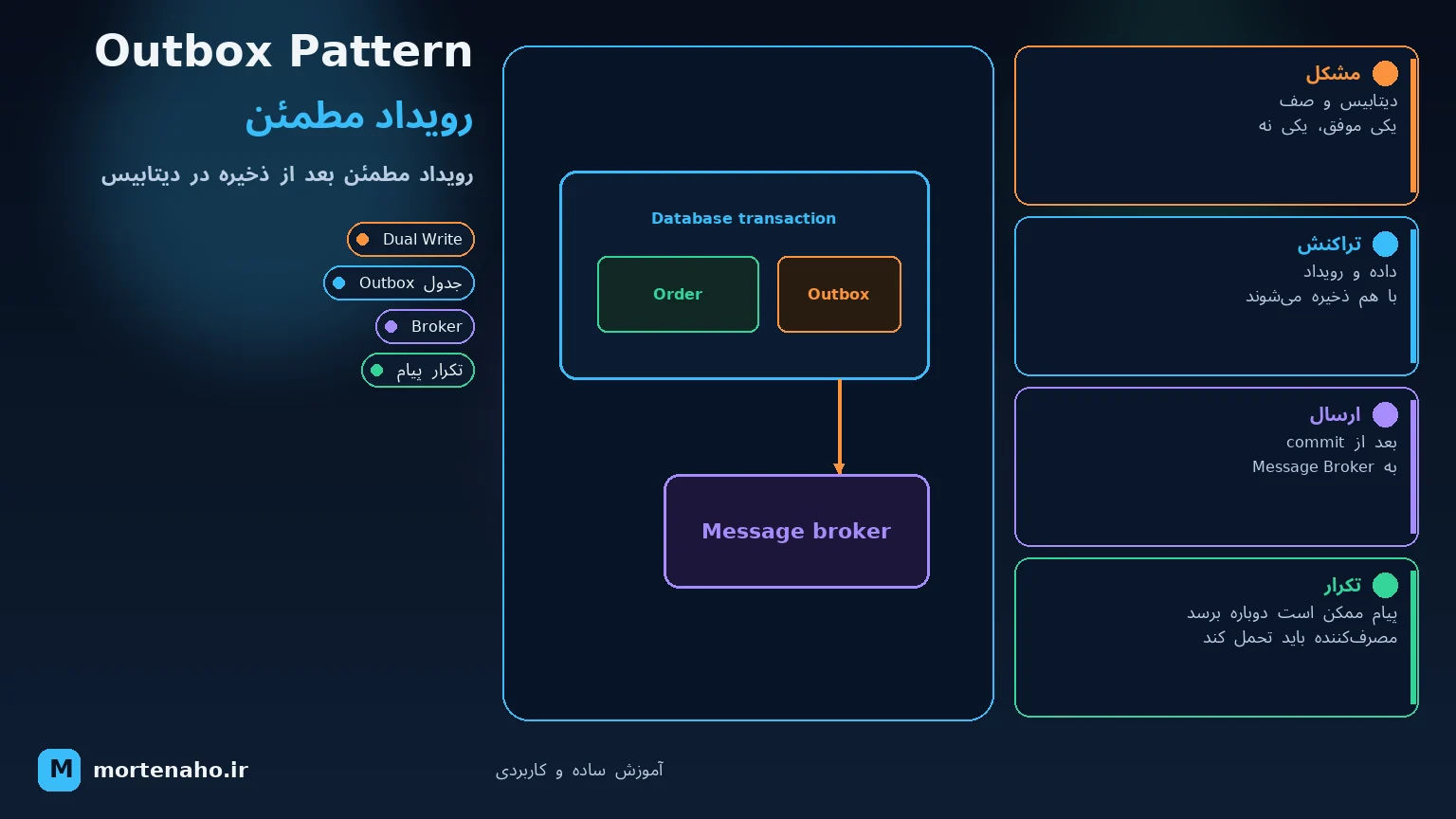
You save an order to the database and want to publish an OrderPlaced event to RabbitMQ or Kafka. If one succeeds and the other fails, your system is inconsistent. The Outbox Pattern is the standard fix.
This article explains what Outbox is, how it works, shows a short EF Core example, and — most importantly — covers the real implementation challenges.
1. What is the Outbox Pattern?
Instead of publishing directly to a message broker after saving to the database, you store the message inside the same database transaction in an Outbox (or OutboxMessages) table.
A separate process — usually a background worker — reads new Outbox rows, publishes them to the broker, and marks each row as sent once the broker confirms.
2. The core problem: dual write
Typical scenario:
- Save the order in SQL Server.
- Publish an
OrderPlacedevent to RabbitMQ.
These are two separate systems. A database transaction doesn't cover the broker, and vice versa. Three bad outcomes are possible:
| Case | Result |
|---|---|
| DB OK, broker fails | Order saved but nobody notified — no email, warehouse unaware. |
| Broker OK, DB rolls back | Message sent but no order exists — consumers get confused. |
| Both OK but crash in between | One may have completed and the other not — hard to tell without detailed logs. |
This is the dual write problem. Outbox says: write in one place only — the database. The broker reads from there later.
3. How Outbox works
Processed.4. A simple .NET + EF Core example
A minimal Outbox entity:
public class OutboxMessage
{
    public Guid Id { get; set; }
    public string Type { get; set; } = "";
    public string Payload { get; set; } = "";
    public DateTime CreatedAt { get; set; }
    public DateTime? ProcessedAt { get; set; }
}
When placing an order, save both in one transaction:
await using var tx = await _db.Database.BeginTransactionAsync();

var order = new Order { /* ... */ };
_db.Orders.Add(order);

_db.OutboxMessages.Add(new OutboxMessage
{
    Id = Guid.NewGuid(),
    Type = "OrderPlaced",
    Payload = JsonSerializer.Serialize(new { order.Id, order.Total }),
    CreatedAt = DateTime.UtcNow
});

await _db.SaveChangesAsync();
await tx.CommitAsync();
A minimal worker (concept only — not production-ready):
var pending = await _db.OutboxMessages
    .Where(m => m.ProcessedAt == null)
    .OrderBy(m => m.CreatedAt)
    .Take(50)
    .ToListAsync();

foreach (var msg in pending)
{
    await _publisher.PublishAsync(msg.Type, msg.Payload);
    msg.ProcessedAt = DateTime.UtcNow;
}
await _db.SaveChangesAsync();5. Implementation challenges
Outbox is a simple idea, but production surfaces several important issues. Know them upfront so you're not surprised later.
5.1 Duplicate messages (at-least-once delivery)
The worker publishes to the broker but crashes before saving ProcessedAt. After restart, the same message is sent again.
Outbox typically guarantees at-least-once — the message arrives at least once, not exactly once. So consumers must be idempotent: if they see the same OrderId again, they must not send another email or deduct stock twice.
MessageId or an IdempotencyKey in a separate table and check before processing.
5.2 Message ordering
If multiple workers read the Outbox concurrently, OrderPaid might reach the broker before OrderCreated.
- For a single aggregate (e.g. one order), order often matters.
- Simple fix: partition by
OrderId— only one worker handles the same key at a time. - Or a single-threaded worker (simple but limits throughput).
5.3 Polling or CDC?
Two common ways to read the Outbox:
| Approach | Pros | Cons |
|---|---|---|
| Polling worker SELECTs every few seconds |
Simple, no extra tooling | Latency, DB load with short intervals |
| CDC e.g. Debezium reads the transaction log |
Faster, fewer extra SELECTs | More complex, needs Kafka Connect or similar |
Start with polling. Consider CDC when event volume grows.
5.4 Outbox table growth
Every event is a row. If you never delete processed rows, the table grows forever and worker queries slow down.
- Periodic cleanup job (e.g. rows older than 7 days).
- Or archive to another table/file.
- Don't forget indexes on
ProcessedAtandCreatedAt.
5.5 Broker downtime
Outbox prevents lost events — messages are safe in the database. But if RabbitMQ or Kafka is down for hours:
- The Outbox table fills up.
- When the broker returns, a large burst of messages is published.
- Consumers must handle the spike.
Outbox doesn't replace broker monitoring; it's a safe bridge between the database and the broker.
5.6 Operational complexity
- You run another service (the worker) to deploy and maintain.
- You need to track Outbox lag — if the worker falls behind, events arrive late.
- With multiple instances, two workers must not grab the same row — you need row locks,
FOR UPDATE SKIP LOCKED(PostgreSQL), or a claim status column. - Frameworks like MassTransit, NServiceBus, or built-in EF Core Outbox handle part of this for you.
6. When you need it (and when you don't)
| Outbox fits when… | Maybe overkill when… |
|---|---|
|
|
7. Summary
- The Outbox Pattern solves the dual write problem between database and broker.
- Store the event in the same DB transaction; a worker publishes to the broker later.
- Typical guarantee is at-least-once — consumers must be idempotent.
- Real challenges: ordering, table growth, polling vs CDC, and worker maintenance.
- Worth it for serious event-driven systems; may be overkill for small projects.
Outbox looks simple — getting it right in production is where real experience begins.