EF Core — How It Works
Understand Entity Framework Core, and how it differs from ADO.NET and Dapper
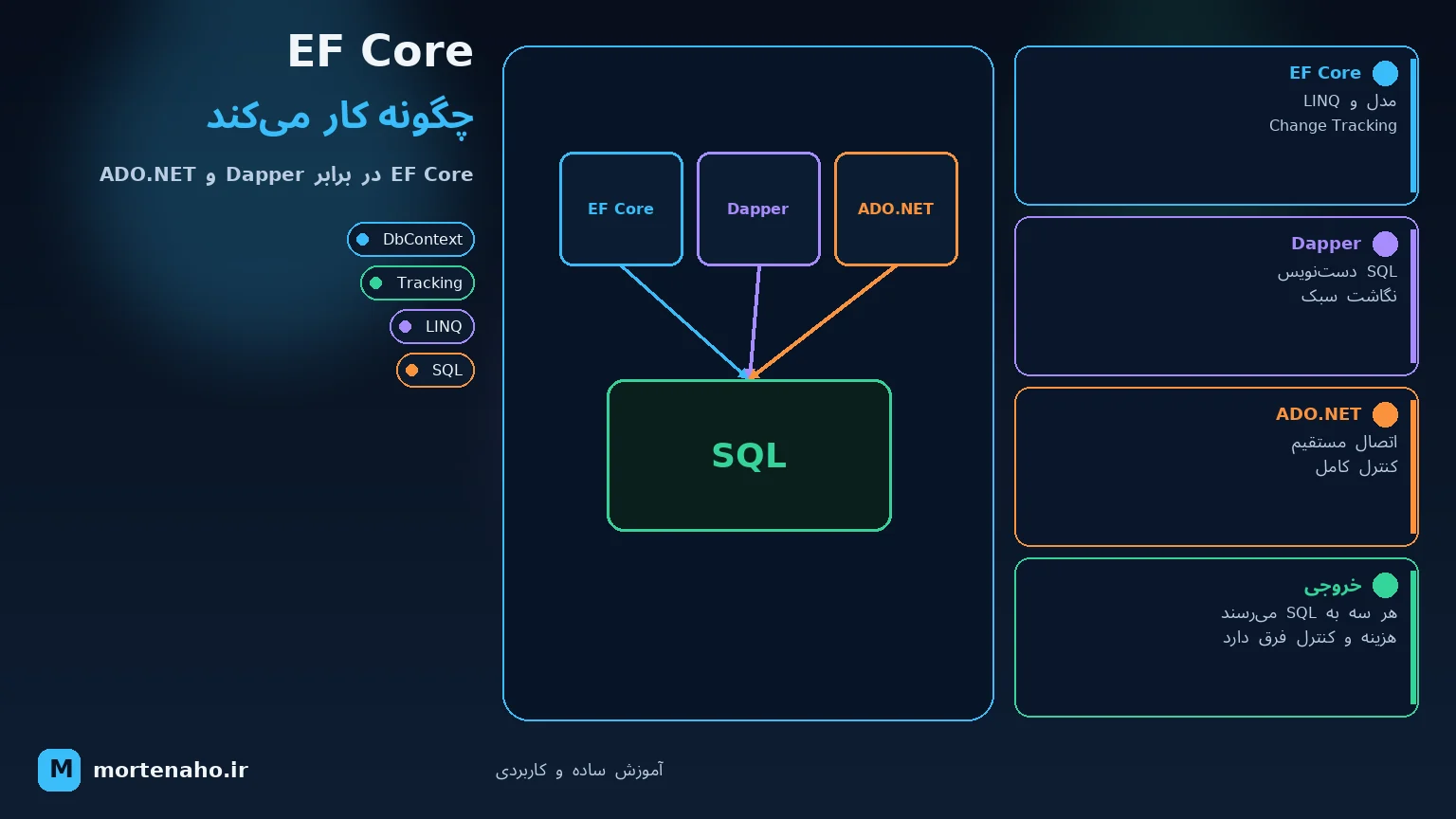
What will you learn here?
This tutorial explains what Entity Framework Core (EF Core) is, how it actually works under the hood, and how it compares to the two other common ways of talking to a database in .NET: raw ADO.NET and the micro-ORM Dapper. You'll see the same query written three ways, understand change tracking and the unit of work, and learn when to pick each tool.
By the end you'll know not just how to use EF Core, but why it behaves the way it does — and when a lighter tool is the better choice.
1. What is EF Core?
Entity Framework Core is Microsoft's official ORM (Object-Relational Mapper) for .NET. In plain words: it lets you work with your database using normal C# classes and objects instead of writing SQL by hand. You say db.Orders.Add(order) and SaveChanges(), and EF Core figures out the INSERT statement, runs it, and brings back the results as objects.
2. What is an ORM?
A database thinks in tables, rows and columns. Your C# code thinks in classes, objects and properties. An ORM is the translator between these two worlds — it "maps" a row in the Orders table to an instance of your Order class, and vice versa.
This is often called the object–relational impedance mismatch, and the ORM exists to hide it:
3. How EF Core works
3.1 DbContext & DbSet
Everything in EF Core revolves around the DbContext. It represents a session with the database — a unit of work. Inside it, each DbSet<T> represents a table you can query and save to.
public class ShopContext : DbContext
{
    public DbSet<Order> Orders => Set<Order>();
    public DbSet<Customer> Customers => Set<Customer>();

    protected override void OnConfiguring(DbContextOptionsBuilder options)
        => options.UseSqlServer("...connection string...");
}

public class Order
{
    public int Id { get; set; }
    public decimal Total { get; set; }
    public DateTime CreatedAt { get; set; }
}
3.2 Change tracking
This is EF Core's "magic" — and the biggest difference from the others. When you load an entity, EF Core keeps a snapshot of it in the change tracker. Later, when you call SaveChanges(), it compares the current values against the snapshot and automatically generates the right INSERT/UPDATE/DELETE for only what changed.
var order = db.Orders.First(o => o.Id == 1);
order.Total = 150;          // you just change a property
db.SaveChanges(); // EF detects it and runs UPDATE automaticallyUPDATE. EF Core noticed Total changed and wrote it for you. This "unit of work" batches all your changes and saves them in one transaction.
3.3 LINQ to SQL translation
You query with LINQ (C#), and EF Core's provider translates that expression tree into SQL for your specific database. The query runs on the server, not in memory.
var bigOrders = db.Orders
    .Where(o => o.Total > 100)
    .OrderByDescending(o => o.CreatedAt)
    .ToList();

// EF Core translates this to roughly:
// SELECT * FROM Orders WHERE Total > 100 ORDER BY CreatedAt DESC.ToList() too early, then filtering), EF can pull the whole table into memory first. Keep filtering before materializing.
3.4 A query's full lifecycle
4. The three layers: ADO.NET, Dapper, EF Core
All three end up sending SQL over the same ADO.NET connection. The difference is how much they do for you:
5. ADO.NET in short
ADO.NET is the low-level data API built into .NET. You manage the connection, write the SQL, add parameters, execute, and read each column manually from a DataReader. Maximum control, maximum boilerplate.
using var conn = new SqlConnection(connStr);
conn.Open();

using var cmd = new SqlCommand(
    "SELECT Id, Total FROM Orders WHERE Total > @min", conn);
cmd.Parameters.AddWithValue("@min", 100);

using var reader = cmd.ExecuteReader();
var orders = new List<Order>();
while (reader.Read())
{
    orders.Add(new Order
    {
        Id = reader.GetInt32(0),
        Total = reader.GetDecimal(1)
    });
}
6. Dapper in short
Dapper is a micro-ORM: a thin set of extension methods on top of ADO.NET. You still write the SQL, but Dapper handles the boring part — opening the reader and mapping each row to your object. It's famous for being extremely fast, very close to raw ADO.NET.
using var conn = new SqlConnection(connStr);

var orders = conn.Query<Order>(
    "SELECT Id, Total FROM Orders WHERE Total > @min",
new { min = 100 }).ToList();7. Same query, three ways
"Get all orders over 100." Here's the essence of each:
ADO.NET
// open connection, build command, add param,
// execute reader, loop rows, map each column by hand
Dapper
conn.Query<Order>("SELECT * FROM Orders WHERE Total > @min",
                  new { min = 100 });
EF Core
db.Orders.Where(o => o.Total > 100).ToList();Notice the trend: ADO.NET = you do everything; Dapper = you write SQL, it maps; EF Core = you write C#, it does the rest.
8. How each runs the same query, step by step
Let's take one task — "get all orders with a total above a given amount" — and follow exactly what each tool does internally. The SQL that hits the database is essentially identical; what differs is the work around it.
ADO.NET — you drive every step
using var conn = new SqlConnection(connStr);
conn.Open();                                   // 1. you open the connection

using var cmd = new SqlCommand(                // 2. you build the command
    "SELECT Id, Total, CreatedAt FROM Orders WHERE Total > @min", conn);
cmd.Parameters.AddWithValue("@min", 100);     // 3. you add the parameter

using var reader = cmd.ExecuteReader();        // 4. you execute, get a reader
var orders = new List<Order>();
while (reader.Read())                           // 5. you loop every row
{
    orders.Add(new Order                       // 6. you map each column by hand
    {
        Id = reader.GetInt32(0),
        Total = reader.GetDecimal(1),
        CreatedAt = reader.GetDateTime(2)
    });
}
// 7. you close everything (using does it here)Dapper — it does steps 4–6 for you
using var conn = new SqlConnection(connStr);

var orders = conn.Query<Order>(                 // open+execute+read+map in one call
    "SELECT Id, Total, CreatedAt FROM Orders WHERE Total > @min",
new { min = 100 }).ToList();Order by matching column names to properties. No change tracking, no SQL generation — just mapping.
EF Core — it even writes the SQL
var orders = db.Orders
    .Where(o => o.Total > 100)                 // a LINQ expression tree
    .ToList();                                  // triggers execution here
Internally, in order:
WHERE [Total] > @__p_0)Order objects9. Running a stored procedure in each
Suppose the database has this procedure:
CREATE PROCEDURE GetOrdersByMinTotal
    @min DECIMAL(18,2)
AS
BEGIN
    SELECT Id, Total, CreatedAt
    FROM Orders
    WHERE Total > @min;
END
ADO.NET — set CommandType to StoredProcedure
using var conn = new SqlConnection(connStr);
conn.Open();

using var cmd = new SqlCommand("GetOrdersByMinTotal", conn);
cmd.CommandType = CommandType.StoredProcedure;   // the important line
cmd.Parameters.AddWithValue("@min", 100);

using var reader = cmd.ExecuteReader();
var orders = new List<Order>();
while (reader.Read())
{
    orders.Add(new Order
    {
        Id = reader.GetInt32(0),
        Total = reader.GetDecimal(1),
        CreatedAt = reader.GetDateTime(2)
    });
}
You name the procedure instead of writing SQL, flip CommandType, add parameters, and map the result yourself — exactly like a normal query.
Dapper — the cleanest of the three for procs
using var conn = new SqlConnection(connStr);

var orders = conn.Query<Order>(
    "GetOrdersByMinTotal",
    new { min = 100 },
commandType: CommandType.StoredProcedure).ToList();commandType: CommandType.StoredProcedure and Dapper maps the result set automatically. For an output parameter, use DynamicParameters and read it back after execution. This is why Dapper is a favourite when a codebase relies heavily on stored procedures.
EF Core — depends on what the proc returns
a) Proc returns rows of an entity / mapped type:
var orders = db.Orders
    .FromSqlInterpolated($"EXEC GetOrdersByMinTotal {100}")
    .ToList();
b) Proc returns rows of a type that isn't a table — map it as a keyless entity first:
// in OnModelCreating:
modelBuilder.Entity<OrderDto>().HasNoKey();

// query:
var rows = db.Set<OrderDto>()
    .FromSqlInterpolated($"EXEC GetOrdersByMinTotal {100}")
    .ToList();
c) Proc only does work / returns a row count (no result set):
db.Database.ExecuteSqlInterpolated(
$"EXEC ArchiveOldOrders {cutoffDate}");FromSql*, EF can't translate further LINQ that the DB wouldn't support on a proc result, and the returned columns must match the target type's properties. Always prefer FromSqlInterpolated / parameters over string concatenation to stay safe from SQL injection.
| Tool | How you call a proc | Mapping |
|---|---|---|
| ADO.NET | CommandType.StoredProcedure | Manual |
| Dapper | commandType: StoredProcedure | Automatic |
| EF Core | FromSqlInterpolated / ExecuteSql* | Automatic (entity / keyless type) |
10. Under the hood: performance & technical differences
All three send nearly identical SQL, so the database does the same work. The performance difference is entirely on the .NET side: how rows are read, how objects are created, and how much bookkeeping each tool does per row. Let's go layer by layer.
10.1 Connection & command
There's no difference here — all three use the same ADO.NET DbConnection and connection pooling. SqlConnection doesn't really open a raw socket every time; it borrows a pooled physical connection. So "opening" a connection is cheap in all three. Parameters are sent as real SQL parameters in every case (so the DB can reuse its execution plan).
10.2 Reading rows — the DataReader
Underneath, all three read results through a DbDataReader, which is a forward-only, streaming cursor. It reads one row at a time off the network buffer — it does not load the whole result set into memory by itself. What you build on top of it is where memory is spent.
10.3 Mapping rows to objects — the real differentiator
| Tool | How mapping works technically | Cost |
|---|---|---|
| ADO.NET | You call reader.GetInt32(0) etc. by hand. Direct, typed, no reflection, no extra allocation beyond your own object. | Baseline — the fastest possible |
| Dapper | On the first call for a given (query shape + type) it emits IL for a mapper delegate and caches it. Subsequent calls run that compiled delegate — essentially as fast as hand-written code. | One-time warm-up, then ~ADO.NET speed |
| EF Core | Builds a materializer too, but also creates tracked entity instances, computes a snapshot, and inserts them into the identity map / change tracker. | Extra CPU + allocations per row |
10.4 Where EF Core spends the extra time
For the exact same query, EF Core does several things the others don't:
- Query translation: the LINQ expression tree must be parsed and translated to SQL. This is cached (the compiled query cache, keyed by the query's shape), so it's mostly a first-hit cost — but the cache lookup itself isn't free.
- Change tracking: each materialized entity gets a tracking entry plus a snapshot of its original values, stored in the identity map. That's more allocations and more CPU per row.
- Identity resolution: EF checks whether an entity with that key is already tracked, to return the same instance (great for correctness, not free).
- Fix-up: when you load related data, EF wires up navigation properties between tracked entities.
AsNoTracking() is faster for read-only queries: it skips the snapshot, the identity map insert, and fix-up. For a large read-only list it can roughly halve the .NET-side cost and allocations.
10.5 Buffered vs streaming & memory
- ADO.NET: you decide — stream row-by-row out of the reader and you can keep memory flat for millions of rows.
- Dapper: defaults to buffered (
Query<T>reads everything into aList). Passbuffered: falseto stream lazily and keep memory low. - EF Core:
.ToList()buffers all;AsAsyncEnumerable()/ iterating the query streams. Tracked entities also stay alive in the context, so a huge tracked query keeps growing memory until the context is disposed.
10.6 Cold start vs warm path
EF Core has a noticeable first-call cost: building the model, compiling the query, warming caches. After warm-up it's much faster. ADO.NET has basically no warm-up; Dapper has a tiny per-(query,type) warm-up to emit IL. For short-lived CLI tools or serverless cold starts, this first-hit difference can matter.
10.7 Ballpark performance
| Tool | Relative read speed* | Allocations / row | CPU overhead |
|---|---|---|---|
| ADO.NET | 1.0× (baseline, fastest) | Lowest | Minimal |
| Dapper | ~1.0–1.1× (near-raw) | Low | Very low |
| EF Core (AsNoTracking) | ~1.2–1.5× | Medium | Low–medium |
| EF Core (tracking) | ~1.5–3× slower | Highest | Highest |
* Rough orders of magnitude for simple read queries; real numbers depend heavily on query shape, row count and version. Always benchmark your own workload (e.g. with BenchmarkDotNet).
11. Full comparison
| Aspect | ADO.NET | Dapper | EF Core |
|---|---|---|---|
| Type | Raw data API | Micro-ORM | Full ORM |
| Who writes SQL | You | You | EF (from LINQ) |
| Object mapping | Manual | Automatic | Automatic |
| Change tracking | No | No | Yes |
| Migrations | No | No | Yes |
| Relationships / joins | Manual | Manual (multi-mapping) | Navigation properties & Include |
| Performance | Fastest | Near-raw | Slight overhead |
| Boilerplate | High | Low | Lowest |
| Learning curve | Low concept, lots of code | Low | Higher (LINQ, tracking, config) |
| Best for | Full control / special cases | Read-heavy, performance-critical | Rich domains, fast development |
12. Common EF Core pitfalls
- N+1 queries: looping over entities and lazily touching a navigation property fires one query per row. Use
.Include()or a projection instead. - Tracking when you don't need it: for read-only lists, use
.AsNoTracking()to skip snapshotting and go faster. - Pulling too much: select only the columns you need with a projection (
.Select(o => new {...})) instead of whole entities. - Client-side evaluation: calling a C# method EF can't translate forces filtering in memory.
- Long-lived DbContext: the context isn't thread-safe and accumulates tracked entities. Keep it short-lived (per request / per unit of work).
13. When to use which
- You have a rich domain model with relationships you want to navigate.
- You value developer productivity, migrations and less SQL.
- Most of your data access is standard CRUD.
- You have read-heavy, performance-critical queries.
- You want full control over hand-tuned SQL but hate manual mapping.
- You're querying complex reports or stored procedures.
- You need absolute control (bulk operations, special providers, streaming).
- You're building a library and don't want any extra dependency.
In practice: many teams use EF Core for writes and most CRUD, and drop down to Dapper for a few hot read paths. They coexist happily on the same connection — it's not all-or-nothing.
Final summary
- EF Core is a full ORM: LINQ in, SQL out, with change tracking and migrations.
- It works by mapping classes to tables, tracking changes, and translating LINQ to SQL — on top of ADO.NET.
- ADO.NET is the raw foundation; Dapper is a thin, fast mapper where you still write SQL.
- Trade-off: more abstraction = less code but a bit more overhead; less abstraction = more control and speed.
- You can — and often should — mix EF Core and Dapper in the same app.
Now you understand how EF Core works and where ADO.NET and Dapper fit. 🗄️