RabbitMQ — What, Why & Where
A friendly introduction to message queues, with .NET examples
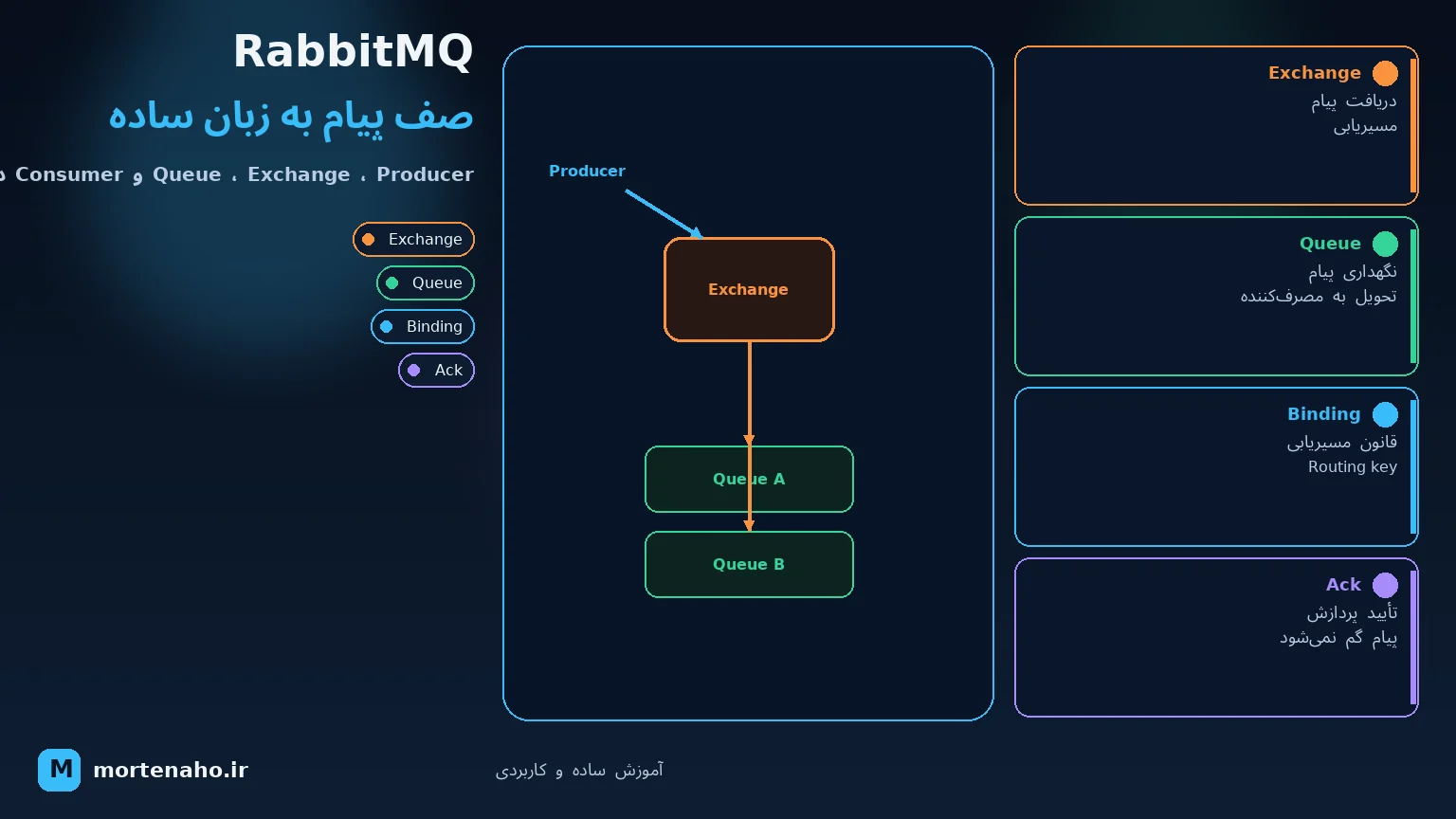
What will you learn here?
This tutorial answers three practical questions about RabbitMQ: what it actually is, why you would add a message broker to your system, and where (and where not) to use it. We'll cover the core concepts — producer, queue, exchange, binding, consumer — the main messaging patterns, and a hands-on example in .NET 8.
No prior message-queue experience needed. If you've built a Web API and felt that some work shouldn't block the HTTP request, this is for you.
1. What is RabbitMQ?
RabbitMQ is a message broker — a middleman that receives messages from one part of your system and delivers them to another. Instead of service A calling service B directly and waiting for an answer, service A drops a message into RabbitMQ, and service B picks it up whenever it's ready.
Think of it like the post office: you don't hand a letter directly to the recipient and stand there until they read it. You drop it in a mailbox, the post office holds and routes it, and the recipient reads it on their own schedule.
2. Why use a message broker?
Imagine an online shop. When a user places an order you need to:
- Save the order
- Send a confirmation email
- Notify the warehouse
- Update analytics
If you do all of that inside the HTTP request, the user waits for everything, and if the email server is slow the whole checkout feels slow. Worse, if the warehouse service is down, the order fails entirely.
With a broker, the API just saves the order and publishes an OrderPlaced message. Everything else happens in the background. The benefits:
| Benefit | What it means |
|---|---|
| Decoupling | The producer doesn't know or care who consumes the message. You can add new consumers without touching the producer. |
| Asynchrony | Slow work (email, reports) happens in the background — the user gets a fast response. |
| Load leveling | A traffic spike fills the queue; consumers drain it at their own pace instead of crashing. |
| Resilience | If a consumer is down, messages wait in the queue and are processed when it comes back. |
| Scalability | Add more consumers to process the same queue faster (competing consumers). |
3. Core concepts
3.1 Producer & Consumer
A producer is any code that sends a message. A consumer is any code that receives and processes it. The same service can be both.
3.2 Queue
A queue is a buffer that stores messages until a consumer takes them. It works first-in, first-out (FIFO). Messages live in the queue until they are acknowledged.
3.3 Exchange & Binding
Here's the part that surprises newcomers: in RabbitMQ a producer never publishes directly to a queue. It publishes to an exchange, and the exchange decides which queue(s) the message goes to, based on rules called bindings and a routing key.
3.4 Acknowledgements (ack)
When a consumer finishes processing a message it sends an ack, telling RabbitMQ "done, you can delete it". If the consumer crashes before ack'ing, RabbitMQ requeues the message so it isn't lost. This is the foundation of reliable delivery.
4. Exchange types
The exchange type controls how messages are routed:
| Type | Routing logic | Use case |
|---|---|---|
| direct | Routing key must match the binding key exactly | Route by category, e.g. order.created |
| fanout | Ignores routing key — copies to every bound queue | Broadcast, e.g. notify all services of an event |
| topic | Pattern match with * and # wildcards | Flexible routing, e.g. order.*.eu |
| headers | Routes on message header values instead of routing key | Complex rules not expressible as a string key |
* matches exactly one word, # matches zero or more words. So order.# matches order.created and order.created.eu.
5. Common messaging patterns
Work Queue (competing consumers)
One queue, many consumers. RabbitMQ load-balances messages across them — great for distributing heavy tasks like image processing.
Publish / Subscribe
A fanout exchange copies each message to many queues, so several services each get their own copy of the same event.
Routing
A direct or topic exchange sends messages only to consumers interested in a specific category.
RPC (request/reply)
A consumer replies to a temporary callback queue. Possible, but if you need this a lot, a direct HTTP/gRPC call is often simpler.
6. Where to use it — and where not
- Background work that shouldn't block the user (emails, PDFs, reports, thumbnails).
- Communication between microservices that should stay decoupled.
- Spiky traffic you want to smooth out (load leveling).
- Event broadcasting — one event, many independent reactions.
- Long-running tasks you want to retry safely on failure.
- You need an immediate synchronous answer (use HTTP/gRPC).
- You need to replay a full history of events or massive event streaming — Kafka fits better.
- Your app is a simple CRUD with no background work — a broker just adds complexity.
- You need strict global ordering across millions of messages — that's hard with multiple consumers.
7. RabbitMQ vs Kafka in depth
This is the most common question people ask, so let's go beyond the one-liner. The two tools look similar (both move messages between services) but they're built on fundamentally different ideas.
The core difference: a queue vs a log
RabbitMQ is a queue. A message is delivered to a consumer and then — once acknowledged — it is deleted. The broker actively pushes messages out and keeps track of who got what. The broker is "smart", the consumer is "simple".
Kafka is an append-only log. Messages (called records) are written to an ordered, immutable log and kept for a configured retention period (e.g. 7 days) regardless of who read them. Consumers pull records and track their own position (the offset). The broker is "simple", the consumer is "smart".
Side-by-side comparison
| Aspect | RabbitMQ | Kafka |
|---|---|---|
| Model | Message queue (broker pushes) | Distributed commit log (consumer pulls) |
| Message lifetime | Deleted after ack | Kept for a retention window; can be re-read |
| Replay history | No — once gone, it's gone | Yes — rewind the offset and re-process |
| Routing | Rich: direct, topic, fanout, headers | Simple: by topic & partition (logic lives in the consumer) |
| Ordering | Per-queue (lost with competing consumers) | Strict order within a partition |
| Throughput | Tens of thousands msg/s — plenty for most apps | Millions msg/s — built for firehose scale |
| Consumers | Many consumers share one queue (work split) | Consumer groups; each group reads the whole topic |
| Typical latency | Very low, single-message friendly | Low, optimized for batches/throughput |
| Operational weight | Lighter; easy to start | Heavier; partitions, brokers, (often) ZooKeeper/KRaft |
| Protocol | AMQP (also MQTT, STOMP) | Its own binary protocol |
How they handle "many consumers" differently
This trips people up the most. Say a single OrderPlaced event must reach an email service, a warehouse service and an analytics service:
- RabbitMQ: a fanout exchange copies the message into three separate queues, one per service. Each queue is then independently emptied.
- Kafka: all three services subscribe to the same
orderstopic as three different consumer groups. The log is read three times — the data isn't copied, each group just keeps its own offset.
And for splitting heavy work across workers of the same service:
- RabbitMQ: run N consumers on one queue — RabbitMQ load-balances messages between them (competing consumers).
- Kafka: the topic must have ≥ N partitions; each consumer in the group is assigned some partitions. You can't have more active consumers than partitions.
When to pick which
- You need a task/job queue — "do this work, once, in the background".
- You want flexible routing (route by type, broadcast, header rules).
- You want per-message acknowledgement and easy retries / dead-lettering.
- Your scale is normal (thousands–tens of thousands/s) and you want simple ops.
- You need event streaming — a durable, replayable history of "what happened".
- Multiple independent teams need to read the same stream over and over.
- You need very high throughput (logs, clickstreams, IoT, metrics).
- You need event sourcing, stream processing (Kafka Streams / ksqlDB) or to replay data into a new system.
Rule of thumb: if you're saying "do this task" → think RabbitMQ. If you're saying "record that this happened, and let anyone replay it" → think Kafka.
8. Hands-on with .NET
Install the official client:
dotnet add package RabbitMQ.ClientProducer — publish a message
using RabbitMQ.Client;
using System.Text;

var factory = new ConnectionFactory { HostName = "localhost" };
using var connection = factory.CreateConnection();
using var channel = connection.CreateModel();

// Make sure the queue exists (durable = survives broker restart)
channel.QueueDeclare(
    queue: "orders",
    durable: true,
    exclusive: false,
    autoDelete: false,
    arguments: null);

var body = Encoding.UTF8.GetBytes("{ \"orderId\": 42 }");

var props = channel.CreateBasicProperties();
props.Persistent = true; // message survives a broker restart

channel.BasicPublish(
    exchange: "",            // default exchange
    routingKey: "orders",    // goes straight to the "orders" queue
    basicProperties: props,
    body: body);

Console.WriteLine("Sent order message");
Consumer — receive and process
using RabbitMQ.Client;
using RabbitMQ.Client.Events;
using System.Text;

var factory = new ConnectionFactory { HostName = "localhost" };
using var connection = factory.CreateConnection();
using var channel = connection.CreateModel();

channel.QueueDeclare("orders", durable: true, exclusive: false,
    autoDelete: false, arguments: null);

// Only give me one message at a time until I ack it
channel.BasicQos(prefetchSize: 0, prefetchCount: 1, global: false);

var consumer = new EventingBasicConsumer(channel);
consumer.Received += (model, ea) =>
{
    var message = Encoding.UTF8.GetString(ea.Body.ToArray());
    Console.WriteLine($"Received: {message}");

    // ... do the actual work here ...

    // Tell RabbitMQ we're done so it can delete the message
    channel.BasicAck(deliveryTag: ea.DeliveryTag, multiple: false);
};

channel.BasicConsume(queue: "orders", autoAck: false, consumer: consumer);

Console.WriteLine("Waiting for messages. Press [enter] to exit.");
Console.ReadLine();
BasicQos(prefetchCount: 1) means "don't send me a new message until I've ack'd the current one". This spreads load fairly when you run multiple consumers.
9. Reliability tips
- Durable queues + persistent messages so data survives a broker restart.
- Manual ack so a crash mid-processing requeues the message instead of losing it.
- Dead Letter Exchange (DLX) — route messages that fail repeatedly to a separate "dead letter" queue for inspection instead of looping forever.
- Idempotent consumers — a message can be delivered more than once, so processing it twice must be safe (e.g. check "did I already handle order 42?").
- Set prefetch to avoid one consumer grabbing thousands of messages while others sit idle.
- Publisher confirms to be sure the broker actually received your message.
10. Running RabbitMQ
The easiest way is Docker, using the image that includes the management UI:
docker run -d --name rabbitmq \
  -p 5672:5672 \
  -p 15672:15672 \
rabbitmq:3-management| Port | Purpose |
|---|---|
| 5672 | AMQP — your apps connect here |
| 15672 | Management web UI |
Open http://localhost:15672 (default login guest / guest) to watch queues, message rates and consumers live.
Final summary
- RabbitMQ is a message broker — the post office between your services.
- Producers publish to an exchange; bindings route to queues; consumers read and ack.
- Use it for background work, decoupling, load leveling and event broadcasting.
- Don't use it for immediate request/reply or massive event-stream replay (consider gRPC or Kafka).
- For reliability: durable + persistent + manual ack + DLX + idempotency.
Now you know what RabbitMQ is, why it helps, and where it fits. 🐰